
MAC.BID
MacDiscountShopping
4.67.11K Reviews
- Version
- 5.8.3
- Installs
- 500.00K
- Age Rating
- Everyone
Screenshots







Our Review of MAC.BID
 Analysis by Appyee
I approached MAC.BID as a shopping app for people who enjoy the possibility of finding a bargain rather than simply adding an item to a cart and checking out. Its central idea is straightforward: browse auctions, place bids, and try to win products at a lower price. That makes it feel very different from a conventional retail app, where the main decision is usually whether the listed price is acceptable.
My first impression was that this is best understood as a marketplace built around timing and judgement. You are not only searching for something you need; you are deciding how much that item is worth to you, how much attention you are willing to give the auction, and when it makes sense to stop. That distinction matters. If you like comparing opportunities and can keep a firm spending limit, the format can be engaging. If you want a predictable purchase with no competitive element, the experience may feel unnecessarily demanding.
How I decide whether MAC.BID is worth using
Before installing any auction-focused shopping app, I think about three questions. Do I enjoy waiting for the right opportunity? Can I resist bidding beyond my original limit? And am I comfortable treating a purchase as a process rather than an immediate transaction? MAC.BID is a good fit when the answer to those questions is mostly yes.
The app is free, aimed at Everyone, and belongs to the Shopping category. It was developed by MacDiscount, and the current release is version 5.8.3. Compatibility begins with Android 8.0, which makes it accessible to many users with older phones while still giving recent Android devices a reasonable starting point.
Its popularity also gives me some confidence that the concept has found an audience. The app has passed half a million installs, with an average rating of 4.6 from roughly seventeen thousand ratings and about seven thousand one hundred written reviews. I would not treat those figures as proof that every auction will be satisfying, but they do suggest that MAC.BID is more than a short-lived experiment.
The most important decision criterion is not the number of products available. It is whether the auction format suits the way you shop. A normal retail app rewards speed: search, compare, buy. MAC.BID rewards patience, attention, and discipline. You may need to revisit an opportunity, assess whether the item is genuinely useful, and decide whether your maximum bid still makes sense as competition develops.
I also recommend separating “a low winning price” from “a good purchase.” Those are not always the same thing. An item can look attractive because the auction result is appealing, yet still be a poor choice if you would not have bought it at all. My most useful rule is simple: decide what the product is worth to you before bidding, not after you become emotionally invested in winning.
What the auction format changes
In a regular shopping app, the displayed price is usually the main reference point. With MAC.BID, the reference point shifts. You are evaluating the item, the current bidding situation, and your own limit at the same time. That creates more room for a bargain, but also more room for impulsive decisions.
This is why I would not use the app casually while tired or distracted. Browsing can be entertaining, but the bidding part deserves the same attention I would give any purchase. I find it helpful to keep a short note of the maximum amount I am prepared to spend and the reason I want the item. If I cannot explain why I need it, I treat that as a signal to leave the auction alone.
Another useful habit is to think in terms of total value rather than headline excitement. A winning bid only feels like a success when the product will actually be used. The app can help you discover opportunities, but it cannot decide whether an opportunity belongs in your home, budget, or routine.
Where MAC.BID works especially well
The strongest part of the experience is the sense of discovery. Instead of opening the app with one fixed product in mind, I can browse a changing selection of auction opportunities and decide which ones deserve attention. That makes the app more interesting than a standard catalogue for users who enjoy exploring.
The store summary describes thousands of daily auctions, and that scale explains the app’s main appeal: there can be plenty to investigate rather than one narrow buying path. I would still avoid assuming that every listing is relevant to me. The real skill is filtering the opportunities mentally and not confusing variety with value.
MAC.BID is particularly useful for flexible purchases. If I need a specific item today, an auction may be too uncertain. But if I am looking for a possible replacement, a gift idea, household equipment, or something I can wait for, the format becomes more practical. The less urgent the need, the more room I have to choose carefully and walk away when the bidding no longer feels worthwhile.
A realistic everyday scenario would be preparing for a move. I might need several practical items, but not necessarily on the same day. Instead of buying everything immediately at the first available price, I could use MAC.BID to watch for suitable opportunities and bid only when the product matches a need already on my list. This approach turns browsing into a controlled search rather than random shopping.
Why browsing can be more valuable than bidding
One less obvious strength is that the app can serve as a discovery tool even when I do not win anything. Looking through auction listings helps me notice product types, compare what catches my attention, and understand which purchases are genuinely important. That makes the app useful before the bidding decision, not just at the moment of placing a bid.
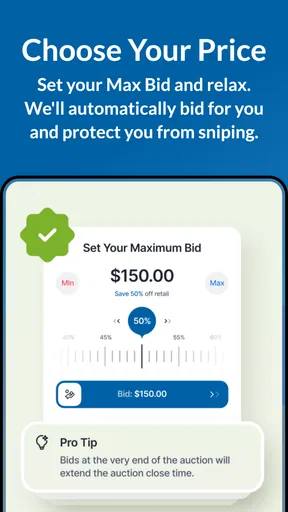
I also like the way the format encourages a personal price ceiling. In a normal store, I may be tempted by a discount label or a limited-time promotion. In an auction, I have to make a more explicit decision about the amount I am willing to spend. That can be a healthy shopping discipline, provided I actually respect the ceiling.
Another practical insight is to use a two-stage workflow. First, browse and save mentally the items that fit a real need. Later, return to those opportunities and decide which one deserves a bid. This reduces the chance that a product feels essential simply because it appeared at an exciting moment. It also makes the app less tiring than trying to react to every auction immediately.
The app’s free price lowers the barrier to trying this approach. I can install it without paying for access and decide from actual use whether auction shopping suits me. That is helpful because the format is personal: some people find it motivating, while others find the uncertainty more stressful than the potential savings are worth.
Where the experience demands discipline
The same auction mechanics that create excitement also create friction. A bid is not the same as a completed purchase, and a potential bargain is not guaranteed. I need to accept that browsing may lead to no purchase at all, especially when I set a sensible limit. For me, that is a sign of good control, not a failed session.
Time is another cost. A conventional store lets me finish the buying process quickly. MAC.BID can invite repeated checking and comparison. That may be enjoyable when I have spare time, but it is not ideal when I need certainty or when I tend to keep monitoring a purchase long after the decision should be over.
There is also a psychological trade-off. Winning can make an item feel more valuable than it was before the auction. I have to remember that the goal is not to beat other bidders; the goal is to obtain something useful at a price I can accept. If the competitive element becomes the main reason I continue, I would rather close the app and reconsider later.
For that reason, I would not recommend MAC.BID as the only shopping tool for essential purchases. It is better as an additional option alongside ordinary retailers. Use a traditional store when delivery timing, exact availability, or a known final price matters more than the possibility of saving money.
How it compares with ordinary shopping alternatives
The clearest alternative is a standard shopping app or retailer website. Those services are usually better when I already know the exact product I want. I can compare listed prices, choose a seller or delivery option, and complete the transaction without waiting for an auction outcome. That predictability is worth paying for when the item is urgent.
MAC.BID has the advantage when I am open to several possibilities and enjoy looking for an opportunity. Its auction structure changes my role from a straightforward buyer into an active participant. I may find a more appealing deal, but I also accept more uncertainty and more responsibility for deciding when to stop.
Deal-alert services are another nearby category. They are useful for people who want a lower price but prefer to wait for a promotion rather than compete in an auction. That approach is often better for someone who dislikes bidding or wants a clearly displayed discount. MAC.BID is more interactive, but the extra involvement is not automatically an advantage.
Used-item marketplaces can also be a better choice when the main priority is a particular second-hand product, local pickup, or direct negotiation. MAC.BID makes more sense when the auction catalogue itself is the attraction and I am comfortable exploring what is available rather than searching only for one exact listing.
I would describe MAC.BID as a complement, not a replacement, for these alternatives. Install it if you want another route to possible savings. Skip it if you already know that auctions encourage you to overspend, check your phone too often, or buy things simply because they seem cheap.
The real cost of switching to auction shopping
Because the app is free, the financial cost of trying it is low. The more meaningful cost is attention. I need to learn how to browse without chasing every opportunity, how to set a personal limit, and how to accept losing an auction without immediately looking for another one.
There is also a learning curve in changing expectations. A standard retailer teaches me that the displayed price is the decision. MAC.BID requires me to think about timing, competition, and whether the product remains worthwhile as the auction develops. That is not difficult, but it does require a different mindset.
My suggested transition is gradual. I would begin with items that are useful but not urgent, set a fixed spending boundary, and avoid bidding on more than one or two opportunities at a time. This makes it easier to judge the app on its actual value rather than on the adrenaline of constant activity.
Another sensible approach is to keep a simple record of successful purchases and abandoned bids. After a few sessions, I can see whether the app is helping me buy better or merely encouraging me to browse more. That distinction is important because an auction app can feel productive even when it has not improved my shopping decisions.
Who should use MAC.BID and who should pass
I recommend MAC.BID to patient shoppers who enjoy discovery, can wait for the right opportunity, and are willing to define a maximum bid before emotions take over. It is also a good option for people who want to explore alternatives to fixed-price retail and do not mind that some browsing sessions end without a purchase.
I would be more cautious about recommending it to anyone shopping under pressure. If you need a replacement immediately, have a strict delivery deadline, or cannot tolerate an uncertain final price, a conventional retailer is likely to be the better tool. The same applies if you find competitive bidding difficult to resist.
The Everyone age rating makes the app broadly accessible, but accessibility does not remove the need for sensible shopping habits. I would still treat bidding as a financial decision and involve a parent or guardian when appropriate for younger users. The app may be easy to open; deciding what is genuinely worth buying requires more maturity than simply browsing.
MacDiscount has kept the basic proposition clear: browse auction opportunities and try to save through bidding. In my experience, the app is most enjoyable when I use it deliberately, with a short list of needs and a firm limit. It is least enjoyable when I open it without a plan and let the stream of possibilities decide what I want.
My final recommendation is therefore conditional but positive. Try MAC.BID if you want a free shopping app with an auction-based approach and you see browsing as part of the fun. Keep your normal retailer for urgent or highly specific purchases, and use this app when patience can genuinely improve the outcome. The best way to use MAC.BID is to treat winning as optional and good judgement as the real goal.
Verdict
Strengths of MAC.BID
- Wide range of auction items, from tools to electronics and home goods.
- Online bidding lets users participate without visiting an auction location.
- New inventory is added regularly across multiple auction sites.
- Item photos and descriptions help compare lots before placing bids.
- Pickup locations and auction details are shown for easier planning.
Limitations of MAC.BID
- Buyer’s premiums, taxes, and fees can significantly increase the final cost.
- Most items are sold as-is, with limited guarantees or return options.
- Pickup windows may be strict and inconvenient for some winning bidders.
- Condition descriptions can vary, so careful inspection is still important.
- Bidding competition may make popular items cost more than expected.
Similar Picks in This Category
View All
SHEIN-Shopping Online
Roadget Business PTE. LTD.4.8

Amazon Shopping
Amazon Mobile LLC4.4


Mercado Libre: Compras online
Mercado Libre4.8

Wish: Shop and Save
Wish US Holdings LLC4.7

Alibaba.com - B2B marketplace
Alibaba Mobile4.4
Frequently Asked Questions
What is MAC.BID and how does the app work?
MAC.BID is a mobile platform associated with online auctions, where users can browse available merchandise, review auction details, and participate in bidding from a smartphone or tablet. After creating an account, you can explore listings, check current prices, view auction deadlines, and place bids when eligible. The exact inventory, bidding rules, and available services may vary by location and auction event.
Do I need an account to place bids on MAC.BID?
Yes, users generally need to register and maintain an account before participating in MAC.BID auctions. Registration may require personal information, contact details, and acceptance of the platform’s terms. Depending on the auction and your location, additional verification or payment information may be requested. It is important to complete your profile accurately and review account requirements before bidding.
Are there additional fees when buying an item through MAC.BID?
The winning bid is not necessarily the final amount you will pay. Depending on the listing, MAC.BID may apply buyer’s premiums, service charges, taxes, documentation costs, or other auction-related fees. Pickup, delivery, storage, and payment processing charges may also apply. Always read the complete listing, fee information, and purchase terms before submitting a bid.
Can I cancel a bid or return an item purchased on MAC.BID?
Bids placed through an auction platform are commonly considered binding, so cancellation may not be available simply because you changed your mind. Return policies can also differ from ordinary retail purchases, particularly for used, surplus, damaged, or sold-as-is merchandise. Before bidding, carefully inspect photos, descriptions, condition notes, pickup instructions, and the applicable terms for that individual listing.
What should I check before downloading and using MAC.BID?
Before downloading MAC.BID, confirm that the app is available in your country and that your device meets the current Android or iOS requirements. Review the developer information, requested permissions, privacy policy, and recent user feedback. Once installed, enable notifications only if useful for auction updates, and make sure you understand payment, pickup, shipping, and bidding deadlines before participating.
